
搜索到
82
篇与
的结果
-
![Centos修改镜像为国内的阿里云源]() Centos修改镜像为国内的阿里云源 众所周知的原因,原版的镜像下载会比较慢,建议改成阿里的会比较快。1.备份你的原镜像文件,以免出错后可以恢复。mv /etc/yum.repos.d/CentOS-Base.repo /etc/yum.repos.d/CentOS-Base.repo.backup2.下载新的CentOS-Base.repo 到/etc/yum.repos.d/wget -O /etc/yum.repos.d/CentOS-Base.repo http://mirrors.aliyun.com/repo/Centos-6.repo如果没有安装wget,可以运行下面命令,安装wgetyum -y install wget如果你的系统是其他版本可以查看http://mirrors.aliyun.com/repo/对应命令wget -O /etc/yum.repos.d/CentOS-Base.repo http://mirrors.aliyun.com/repo/Centos-5.repo3.运行yum makecache生成缓存yum makecache其他不错的源网易开源镜像站:http://mirrors.163.com/中科大的Linux安装镜像源:http://centos.ustc.edu.cn/搜狐的Linux安装镜像源:http://mirrors.sohu.com/
Centos修改镜像为国内的阿里云源 众所周知的原因,原版的镜像下载会比较慢,建议改成阿里的会比较快。1.备份你的原镜像文件,以免出错后可以恢复。mv /etc/yum.repos.d/CentOS-Base.repo /etc/yum.repos.d/CentOS-Base.repo.backup2.下载新的CentOS-Base.repo 到/etc/yum.repos.d/wget -O /etc/yum.repos.d/CentOS-Base.repo http://mirrors.aliyun.com/repo/Centos-6.repo如果没有安装wget,可以运行下面命令,安装wgetyum -y install wget如果你的系统是其他版本可以查看http://mirrors.aliyun.com/repo/对应命令wget -O /etc/yum.repos.d/CentOS-Base.repo http://mirrors.aliyun.com/repo/Centos-5.repo3.运行yum makecache生成缓存yum makecache其他不错的源网易开源镜像站:http://mirrors.163.com/中科大的Linux安装镜像源:http://centos.ustc.edu.cn/搜狐的Linux安装镜像源:http://mirrors.sohu.com/ -
![Laravel中cookie存数组]() Laravel中cookie存数组 function makeCookie($key,$val){ // 查看cookie中是否已经存过键为history_ids if(Cookie::has($key)){ // 已经存过了 $json_str = Cookie::get($key); // 获取的数据是json字符串,需要转成数组 $arr = json_decode($json_str,true); // 判断数组中的某个键是否存在 if(!array_key_exists($val,$arr)){ $arr[$val] = ["id"=>$val]; // [ ["id"=>4], ["id"=>888] ] // 将二维数组转成json格式的字符串 $json_str = json_encode($arr); Cookie::queue($key,$json_str); } }else{ // 还没存呢 第一次 $arr[$val]['id'] = $val; $json_str = json_encode($arr); // json形式的字符串 Cookie::queue($key,$json_str); }
Laravel中cookie存数组 function makeCookie($key,$val){ // 查看cookie中是否已经存过键为history_ids if(Cookie::has($key)){ // 已经存过了 $json_str = Cookie::get($key); // 获取的数据是json字符串,需要转成数组 $arr = json_decode($json_str,true); // 判断数组中的某个键是否存在 if(!array_key_exists($val,$arr)){ $arr[$val] = ["id"=>$val]; // [ ["id"=>4], ["id"=>888] ] // 将二维数组转成json格式的字符串 $json_str = json_encode($arr); Cookie::queue($key,$json_str); } }else{ // 还没存呢 第一次 $arr[$val]['id'] = $val; $json_str = json_encode($arr); // json形式的字符串 Cookie::queue($key,$json_str); } -
![git本地分支推送到远程分支]() git本地分支推送到远程分支 1、远端git库的创建和初始化创建git仓库可以在远端创建一个仓库,然后check到本地,在本地的文件里创建工程文件,然后提交也可以将本地现有的工程和远端的空仓库关联本地创建了一个工程 iOSDemo运行没有错误,就可以提交到远端了。一般情况下,远端仓库创建成功之后会有以下提示 ,如仓库名为:reposityName#Command line instructions #Git global setup --全局配置git账户名和关联邮箱 git config --global user.name "wjwdive" git config --global user.email "wjwdive@wjw.com.cn" #Create a new repository --第一种方式在你的某个目录启动终端命令,clone远端仓库到本地 git clone http://gitlab.wjw.com.cn/ios/reposityName.git cd reposityName touch README.md git add README.md git commit -m "add README" git push -u origin master #Existing folder --第二种方式,在本地文件夹初始化一个git库,并关联到远端仓库的master分支 cd existing_folder git init git remote add origin http://gitlab.wjw.com.cn/ios/reposityName.git git add . git commit -m "Initial commit" git push -u origin master #Existing Git repository --第三种方式,已经有本地git库,关联到远端仓库。用Xcode创建工程时勾选了本地 git cd existing_repo git remote rename origin old-origin git remote add origin http://gitlab.wjw.com.cn/ios/reposityName.git git push -u origin --all git push -u origin --tags 2、git创建分支并切换到当前新创建的分支上git checkout -b dev开发完成后git push origin dev此时就将本地分支推送到远程相应的分支上了记得推到远端之前先拉取最新代码git pull然后如果本地有一个分支是你创建的dev0628 ,是不能直接提交代码到远程的,因为远程并没有一个叫 origin/dev0628 的分支,需要将本地dev0628 关联到远程 origin/dev0628$git branch --set-upstream dev0628 origin/dev0628 fatal: the '--set-upstream' option is no longer supported. Please use '--track' or '--set-upstream-to' instead. --set-upstream已经过时,需要用 新的命令 --set-upstream-to $git branch --set-upstream-to origin/dev0628 Branch 'dev0628' set up to track remote branch 'dev0628' from 'origin'.这样本地分支就和远程分支关联起来了
git本地分支推送到远程分支 1、远端git库的创建和初始化创建git仓库可以在远端创建一个仓库,然后check到本地,在本地的文件里创建工程文件,然后提交也可以将本地现有的工程和远端的空仓库关联本地创建了一个工程 iOSDemo运行没有错误,就可以提交到远端了。一般情况下,远端仓库创建成功之后会有以下提示 ,如仓库名为:reposityName#Command line instructions #Git global setup --全局配置git账户名和关联邮箱 git config --global user.name "wjwdive" git config --global user.email "wjwdive@wjw.com.cn" #Create a new repository --第一种方式在你的某个目录启动终端命令,clone远端仓库到本地 git clone http://gitlab.wjw.com.cn/ios/reposityName.git cd reposityName touch README.md git add README.md git commit -m "add README" git push -u origin master #Existing folder --第二种方式,在本地文件夹初始化一个git库,并关联到远端仓库的master分支 cd existing_folder git init git remote add origin http://gitlab.wjw.com.cn/ios/reposityName.git git add . git commit -m "Initial commit" git push -u origin master #Existing Git repository --第三种方式,已经有本地git库,关联到远端仓库。用Xcode创建工程时勾选了本地 git cd existing_repo git remote rename origin old-origin git remote add origin http://gitlab.wjw.com.cn/ios/reposityName.git git push -u origin --all git push -u origin --tags 2、git创建分支并切换到当前新创建的分支上git checkout -b dev开发完成后git push origin dev此时就将本地分支推送到远程相应的分支上了记得推到远端之前先拉取最新代码git pull然后如果本地有一个分支是你创建的dev0628 ,是不能直接提交代码到远程的,因为远程并没有一个叫 origin/dev0628 的分支,需要将本地dev0628 关联到远程 origin/dev0628$git branch --set-upstream dev0628 origin/dev0628 fatal: the '--set-upstream' option is no longer supported. Please use '--track' or '--set-upstream-to' instead. --set-upstream已经过时,需要用 新的命令 --set-upstream-to $git branch --set-upstream-to origin/dev0628 Branch 'dev0628' set up to track remote branch 'dev0628' from 'origin'.这样本地分支就和远程分支关联起来了 -
![gitee常用代码]() gitee常用代码 https://gitee.com/itzhangxuhui/lv-mall.git git config --global user.name "初心" git config --global user.email "137647337@qq.com" mkdir lv-mall cd lv-mall git init touch README.md git add README.md git commit -m "first commit" git remote add origin https://gitee.com/itzhangxuhui/lv-mall.git git push -u origin "master" cd existing_git_repo git remote add origin https://gitee.com/itzhangxuhui/lv-mall.git git push -u origin "master" Content-Type: application/x-www-form-urlencoded
gitee常用代码 https://gitee.com/itzhangxuhui/lv-mall.git git config --global user.name "初心" git config --global user.email "137647337@qq.com" mkdir lv-mall cd lv-mall git init touch README.md git add README.md git commit -m "first commit" git remote add origin https://gitee.com/itzhangxuhui/lv-mall.git git push -u origin "master" cd existing_git_repo git remote add origin https://gitee.com/itzhangxuhui/lv-mall.git git push -u origin "master" Content-Type: application/x-www-form-urlencoded -
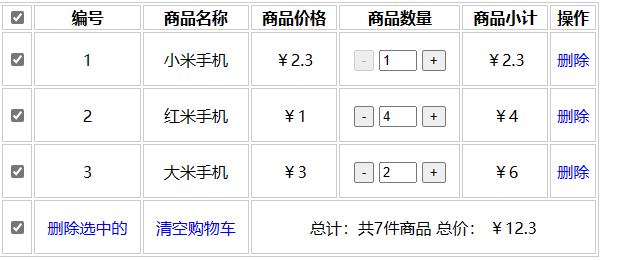
![jQuery代码实现购物车效果]() jQuery代码实现购物车效果 <!DOCTYPE html> <html lang="en"> <head> <meta charset="UTF-8"> <meta http-equiv="X-UA-Compatible" content="IE=edge"> <meta name="viewport" content="width=device-width, initial-scale=1.0"> <title>Document</title> <script src="https://cdn.bootcdn.net/ajax/libs/jquery/3.6.4/jquery.js"></script> <style> table { width: 600px; } td { height: 50px; text-align: center; } table,tr,td,th { border: 1px solid #ccc; } a { text-decoration: none; } .emptyCart{ display: none; width: 600px; height: 100px; border: 1px solid red; text-align: center; line-height: 100px; } </style> </head> <body> <!-- <button> <a href="javascript:alert('清除成功')">清除缓存</a></button> --> <div class="emptyCart"> 购物车空空的哦~,去看看心仪的商品吧~ 去购物> </div> <table> <thead> <tr> <th><input type="checkbox" name="" class="checkAll"></th> <th>编号</th> <th>商品名称</th> <th>商品价格</th> <th>商品数量</th> <th>商品小计</th> <th>操作</th> </tr> </thead> <tbody> <tr> <td><input type="checkbox" class="chk"></td> <td class="bianhao">1</td> <td>小米手机</td> <td>¥2.3</td> <td> <button class="decrement" data-index="1">-</button> <input type="text" class='num' value="1" style="width:30px" readonly> <button class="increment">+</button> </td> <td class="xiaoji">¥2.3</td> <td > <a href="javascript:;" class="del">删除</a> </td> </tr> <tr> <td><input type="checkbox" class="chk"></td> <td class="bianhao">2</td> <td>红米手机</td> <td>¥1</td> <td> <button class="decrement" data-index="1">-</button> <input type="text" class='num' value="4" style="width:30px"> <button class="increment">+</button> </td> <td class="xiaoji">¥4</td> <td > <a href="javascript:;" class="del">删除</a> </td> </tr> <tr> <td><input type="checkbox" class="chk"></td> <td class="bianhao">3</td> <td>大米手机</td> <td>¥3</td> <td> <button class="decrement">-</button> <input type="text" class='num' value="2" style="width:30px"> <button class="increment">+</button> </td> <td class="xiaoji">¥6</td> <td > <a href="javascript:;" class="del">删除</a> </td> </tr> </tbody> <tfoot> <tr> <td><input type="checkbox" name="" class="checkAll"></td> <td><a href="javascript:;" id="delSelect">删除选中的</a></td> <td><a href="javascript:;" id="clearCart">清空购物车</a></td> <td colspan="4"> 总计:共<span id="totalNums"></span>件商品 总价: <span class="totalMoneys"></span> </td> </tr> </tfoot> </table> <script> // 7.打开页面,复选框被选中 $('input:checkbox').prop('checked',true); // 判断value为1的 让减禁用 // $('.num').each(function(i,ele){ // if($(ele).val() == 1){ // $(this).prev().prop('disabled',true); // $(this).prev().css('cursor','not-allowed'); // }else{ // $(this).prev().prop('disabled',false); // $(this).prev().css('cursor','default'); // } // }); // 判断value为1的 让减禁用 $('input[value=1]').prev().prop('disabled',true).css('cursor','not-allowed'); // $('input[value="1"]').prev().css('disabled',true); // 改变总件,总价 function changeTotalNumAndTotalPrice(){ // 计算被选中的商品的总件,总价 var sum = 0; var totalMoneys = 0; $('.chk:checked').each(function(){ sum += $(this).parents('tr').find('.num').val()-0; totalMoneys += $(this).parents('tr').find('.xiaoji').text().substr(1)-0; }); $('#totalNums').text(sum); $('.totalMoneys').text('¥'+ totalMoneys) // console.log(sum); // 1.遍历所有的数量 = 总件 // var sum = 0; // $('.num').each(function(i,ele){ // sum += $(ele).val()-0; // // console.log(i,$(ele).val()-0); // }); // // 修改总件 // $('#totalNums').text(sum); // // 2.遍历所有小计 = 总价 // var totalMoneys = 0; // $('.xiaoji').each(function(i,ele){ // totalMoneys += $(ele).text().substr(1)-0; // // console.log(i,$(ele).val()-0); // }); // // 总价 // $('.totalMoneys').text('¥'+ totalMoneys) } // 刚刚打开页面 changeTotalNumAndTotalPrice(); // 重置序号函数 function resetNum(){ $('.bianhao').each(function(i,ele){ // console.log(i,ele); $(this).text(i+1); }); } // 1.点击了购物车的全选按钮 $('.checkAll').change(function(){ $('.chk').prop('checked',$(this).prop('checked')); // 把全选的状态赋值给下面每个复选框 $('.checkAll').prop('checked',$(this).prop('checked'));// 另外一个checkAll根据当前checkAll的状态而改变 if($(this).prop('checked')){ changeTotalNumAndTotalPrice(); }else{ // 用户点击了取消全选 件数为0 总价 为0.00 $('#totalNums').text(0); $('.totalMoneys').text('¥0.00'); } }) // 2.点击了每个复选框,改变的全选 ,选中的长度 == 总长度 ,说明全选应该被选中了 $('.chk').change(function () { // console.log($('.chk').length); // 总长度 // console.log($('.chk:checked').length); // 被选中的长度 if($('.chk').length == $('.chk:checked').length){ $('.checkAll').prop('checked',true); // 说明全选应该被选中了 }else{ $('.checkAll').prop('checked',false); // 说明全选应该被取消了 } changeTotalNumAndTotalPrice(); }) // 3.商品数量改变 // 3.1 加 $('.increment').click(function(){ $(this).parents('tr').find('.chk').prop('checked',true); $(this).prevAll('.decrement').prop('disabled',false); $(this).prevAll('.decrement').css('cursor','default'); // 1.数量+1 获取数量 + 1 ,修改数量 var num = $(this).prev().val()-0; num++; $(this).prev().val(num); // 2.小计改变 小计 = 数量 * 价格 ,赋值给小计 var price = $(this).parent().prev().text().substr(1)-0; // 截取 substr(1) var totalPrice = num * price; $(this).parent().next().text('¥'+totalPrice.toFixed(2)); // 3.改变总件 // 4.改变总价 changeTotalNumAndTotalPrice(); // console.log($(this)); if($('.chk').length == $('.chk:checked').length){ $('.checkAll').prop('checked',true); // 说明全选应该被选中了 }else{ $('.checkAll').prop('checked',false); // 说明全选应该被取消了 } }); // 3.2 减 $('.decrement').click(function(){ $(this).parents('tr').find('.chk').prop('checked',true); // 1.数量-1 获取数量 - 1 ,修改数量 var num = $(this).next().val()-0; // 减之前是几?就不让减了 num--; console.log(num); $(this).next().val(num); // 2.小计改变 小计 = 数量 * 价格 ,赋值给小计 var price = $(this).parent().prev().text().substr(1)-0; // 截取 substr(1) var totalPrice = num * price; $(this).parent().next().text('¥'+totalPrice.toFixed(2)); // 3.改变总件 // 4.改变总价 changeTotalNumAndTotalPrice(); // console.log($(this)); if(num == 1){ // 禁用 $(this).prop('disabled',true); $(this).css('cursor','not-allowed'); } if($('.chk').length == $('.chk:checked').length){ $('.checkAll').prop('checked',true); // 说明全选应该被选中了 }else{ $('.checkAll').prop('checked',false); // 说明全选应该被取消了 } }); // 4.删除单个商品 $('.del').click(function(){ // 删除a ,爸爸的爸爸 // $(this).parent().parent().remove(); if(confirm('你确定要删除吗?')){ $(this).parents('tr').remove(); changeTotalNumAndTotalPrice(); // 删除后,获取所有的剩余商品的编号,重置 // console.log( $('.bianhao')); resetNum(); if($('tbody').children().length ===0){ $('table').remove(); $('.emptyCart').css('display','block'); } } // console.log($(this)); }) // 5.删除选中,点击了删除选中按钮,就删除选中的商品 $('#delSelect').click(function(){ if(confirm('你确定要删除吗?')){ $('.chk:checked').parents('tr').remove(); resetNum(); changeTotalNumAndTotalPrice(); // 我们怎么知道删完了呢?根据tbody的孩子的长度 console.log($('tbody').children()); if($('tbody').children().length ===0){ $('table').remove(); $('.emptyCart').css('display','block'); } } }) // 6.清空购物车 $('#clearCart').click(function(){ $('table').remove(); $('.emptyCart').css('display','block'); }); </script> </body> </html>
jQuery代码实现购物车效果 <!DOCTYPE html> <html lang="en"> <head> <meta charset="UTF-8"> <meta http-equiv="X-UA-Compatible" content="IE=edge"> <meta name="viewport" content="width=device-width, initial-scale=1.0"> <title>Document</title> <script src="https://cdn.bootcdn.net/ajax/libs/jquery/3.6.4/jquery.js"></script> <style> table { width: 600px; } td { height: 50px; text-align: center; } table,tr,td,th { border: 1px solid #ccc; } a { text-decoration: none; } .emptyCart{ display: none; width: 600px; height: 100px; border: 1px solid red; text-align: center; line-height: 100px; } </style> </head> <body> <!-- <button> <a href="javascript:alert('清除成功')">清除缓存</a></button> --> <div class="emptyCart"> 购物车空空的哦~,去看看心仪的商品吧~ 去购物> </div> <table> <thead> <tr> <th><input type="checkbox" name="" class="checkAll"></th> <th>编号</th> <th>商品名称</th> <th>商品价格</th> <th>商品数量</th> <th>商品小计</th> <th>操作</th> </tr> </thead> <tbody> <tr> <td><input type="checkbox" class="chk"></td> <td class="bianhao">1</td> <td>小米手机</td> <td>¥2.3</td> <td> <button class="decrement" data-index="1">-</button> <input type="text" class='num' value="1" style="width:30px" readonly> <button class="increment">+</button> </td> <td class="xiaoji">¥2.3</td> <td > <a href="javascript:;" class="del">删除</a> </td> </tr> <tr> <td><input type="checkbox" class="chk"></td> <td class="bianhao">2</td> <td>红米手机</td> <td>¥1</td> <td> <button class="decrement" data-index="1">-</button> <input type="text" class='num' value="4" style="width:30px"> <button class="increment">+</button> </td> <td class="xiaoji">¥4</td> <td > <a href="javascript:;" class="del">删除</a> </td> </tr> <tr> <td><input type="checkbox" class="chk"></td> <td class="bianhao">3</td> <td>大米手机</td> <td>¥3</td> <td> <button class="decrement">-</button> <input type="text" class='num' value="2" style="width:30px"> <button class="increment">+</button> </td> <td class="xiaoji">¥6</td> <td > <a href="javascript:;" class="del">删除</a> </td> </tr> </tbody> <tfoot> <tr> <td><input type="checkbox" name="" class="checkAll"></td> <td><a href="javascript:;" id="delSelect">删除选中的</a></td> <td><a href="javascript:;" id="clearCart">清空购物车</a></td> <td colspan="4"> 总计:共<span id="totalNums"></span>件商品 总价: <span class="totalMoneys"></span> </td> </tr> </tfoot> </table> <script> // 7.打开页面,复选框被选中 $('input:checkbox').prop('checked',true); // 判断value为1的 让减禁用 // $('.num').each(function(i,ele){ // if($(ele).val() == 1){ // $(this).prev().prop('disabled',true); // $(this).prev().css('cursor','not-allowed'); // }else{ // $(this).prev().prop('disabled',false); // $(this).prev().css('cursor','default'); // } // }); // 判断value为1的 让减禁用 $('input[value=1]').prev().prop('disabled',true).css('cursor','not-allowed'); // $('input[value="1"]').prev().css('disabled',true); // 改变总件,总价 function changeTotalNumAndTotalPrice(){ // 计算被选中的商品的总件,总价 var sum = 0; var totalMoneys = 0; $('.chk:checked').each(function(){ sum += $(this).parents('tr').find('.num').val()-0; totalMoneys += $(this).parents('tr').find('.xiaoji').text().substr(1)-0; }); $('#totalNums').text(sum); $('.totalMoneys').text('¥'+ totalMoneys) // console.log(sum); // 1.遍历所有的数量 = 总件 // var sum = 0; // $('.num').each(function(i,ele){ // sum += $(ele).val()-0; // // console.log(i,$(ele).val()-0); // }); // // 修改总件 // $('#totalNums').text(sum); // // 2.遍历所有小计 = 总价 // var totalMoneys = 0; // $('.xiaoji').each(function(i,ele){ // totalMoneys += $(ele).text().substr(1)-0; // // console.log(i,$(ele).val()-0); // }); // // 总价 // $('.totalMoneys').text('¥'+ totalMoneys) } // 刚刚打开页面 changeTotalNumAndTotalPrice(); // 重置序号函数 function resetNum(){ $('.bianhao').each(function(i,ele){ // console.log(i,ele); $(this).text(i+1); }); } // 1.点击了购物车的全选按钮 $('.checkAll').change(function(){ $('.chk').prop('checked',$(this).prop('checked')); // 把全选的状态赋值给下面每个复选框 $('.checkAll').prop('checked',$(this).prop('checked'));// 另外一个checkAll根据当前checkAll的状态而改变 if($(this).prop('checked')){ changeTotalNumAndTotalPrice(); }else{ // 用户点击了取消全选 件数为0 总价 为0.00 $('#totalNums').text(0); $('.totalMoneys').text('¥0.00'); } }) // 2.点击了每个复选框,改变的全选 ,选中的长度 == 总长度 ,说明全选应该被选中了 $('.chk').change(function () { // console.log($('.chk').length); // 总长度 // console.log($('.chk:checked').length); // 被选中的长度 if($('.chk').length == $('.chk:checked').length){ $('.checkAll').prop('checked',true); // 说明全选应该被选中了 }else{ $('.checkAll').prop('checked',false); // 说明全选应该被取消了 } changeTotalNumAndTotalPrice(); }) // 3.商品数量改变 // 3.1 加 $('.increment').click(function(){ $(this).parents('tr').find('.chk').prop('checked',true); $(this).prevAll('.decrement').prop('disabled',false); $(this).prevAll('.decrement').css('cursor','default'); // 1.数量+1 获取数量 + 1 ,修改数量 var num = $(this).prev().val()-0; num++; $(this).prev().val(num); // 2.小计改变 小计 = 数量 * 价格 ,赋值给小计 var price = $(this).parent().prev().text().substr(1)-0; // 截取 substr(1) var totalPrice = num * price; $(this).parent().next().text('¥'+totalPrice.toFixed(2)); // 3.改变总件 // 4.改变总价 changeTotalNumAndTotalPrice(); // console.log($(this)); if($('.chk').length == $('.chk:checked').length){ $('.checkAll').prop('checked',true); // 说明全选应该被选中了 }else{ $('.checkAll').prop('checked',false); // 说明全选应该被取消了 } }); // 3.2 减 $('.decrement').click(function(){ $(this).parents('tr').find('.chk').prop('checked',true); // 1.数量-1 获取数量 - 1 ,修改数量 var num = $(this).next().val()-0; // 减之前是几?就不让减了 num--; console.log(num); $(this).next().val(num); // 2.小计改变 小计 = 数量 * 价格 ,赋值给小计 var price = $(this).parent().prev().text().substr(1)-0; // 截取 substr(1) var totalPrice = num * price; $(this).parent().next().text('¥'+totalPrice.toFixed(2)); // 3.改变总件 // 4.改变总价 changeTotalNumAndTotalPrice(); // console.log($(this)); if(num == 1){ // 禁用 $(this).prop('disabled',true); $(this).css('cursor','not-allowed'); } if($('.chk').length == $('.chk:checked').length){ $('.checkAll').prop('checked',true); // 说明全选应该被选中了 }else{ $('.checkAll').prop('checked',false); // 说明全选应该被取消了 } }); // 4.删除单个商品 $('.del').click(function(){ // 删除a ,爸爸的爸爸 // $(this).parent().parent().remove(); if(confirm('你确定要删除吗?')){ $(this).parents('tr').remove(); changeTotalNumAndTotalPrice(); // 删除后,获取所有的剩余商品的编号,重置 // console.log( $('.bianhao')); resetNum(); if($('tbody').children().length ===0){ $('table').remove(); $('.emptyCart').css('display','block'); } } // console.log($(this)); }) // 5.删除选中,点击了删除选中按钮,就删除选中的商品 $('#delSelect').click(function(){ if(confirm('你确定要删除吗?')){ $('.chk:checked').parents('tr').remove(); resetNum(); changeTotalNumAndTotalPrice(); // 我们怎么知道删完了呢?根据tbody的孩子的长度 console.log($('tbody').children()); if($('tbody').children().length ===0){ $('table').remove(); $('.emptyCart').css('display','block'); } } }) // 6.清空购物车 $('#clearCart').click(function(){ $('table').remove(); $('.emptyCart').css('display','block'); }); </script> </body> </html> -
![Java学习之~ArrayList实现学生管理系统]() Java学习之~ArrayList实现学生管理系统 1.Student类文件 Student.javapackage cc.itnan.study; public class Student { private String stuNum; private String stuName; private int age; private String brithDay; public Student() { } public Student(String stuNum, String stuName, int age, String brithDay) { this.stuNum = stuNum; this.stuName = stuName; this.age = age; this.brithDay = brithDay; } /** * 获取 * @return stuNum */ public String getStuNum() { return stuNum; } /** * 设置 * @param stuNum */ public void setStuNum(String stuNum) { this.stuNum = stuNum; } /** * 获取 * @return stuName */ public String getStuName() { return stuName; } /** * 设置 * @param stuName */ public void setStuName(String stuName) { this.stuName = stuName; } /** * 获取 * @return age */ public int getAge() { return age; } /** * 设置 * @param age */ public void setAge(int age) { this.age = age; } /** * 获取 * @return brithDay */ public String getBrithDay() { return brithDay; } /** * 设置 * @param brithDay */ public void setBrithDay(String brithDay) { this.brithDay = brithDay; } } 2.StudentTest类文件 StudentTest.javapackage cc.itnan.study; import java.util.ArrayList; import java.util.Scanner; public class StudentTest { public static void main(String[] args) { ArrayList<Student> list = new ArrayList<>(); // list.add(new Student("1001","小明",18,"2000")); // list.add(new Student("1002","大明",19,"2001")); // list.add(new Student("1003","老明",20,"2002")); while (true) { System.out.println("---------------------欢迎来到学生管理系统---------------------"); System.out.println("1.添加学生"); System.out.println("2.删除学生"); System.out.println("3.修改学生"); System.out.println("4.查看学生"); System.out.println("5.退出"); Scanner sc = new Scanner(System.in); int chioce = sc.nextInt(); switch (chioce){ case 1: System.out.println("添加学生"); addStudent(list); break; case 2: System.out.println("删除学生"); deleteStudent(list); break; case 3: System.out.println("修改学生"); updateStudent(list); break; case 4: System.out.println("查看学生"); queryStudentInfo(list); break; case 5: System.out.println("再见!"); System.exit(0); break; default: System.out.println("输入有误,请检查!"); } } } private static void addStudent(ArrayList<Student> list) { Scanner sc = new Scanner(System.in); String stuNum; while (true){ System.out.println("请输入学生学号:"); stuNum = sc.next(); if(getIndexById(stuNum,list) == -1){ break; } } System.out.println("请输入学生姓名:"); String stuName = sc.next(); System.out.println("请输入学生年龄:"); int age = sc.nextInt(); System.out.println("请输入学生生日:"); String birthDay = sc.next(); list.add(new Student(stuNum,stuName,age,birthDay)); System.out.println("添加成功!"); } private static void updateStudent(ArrayList<Student> list) { Scanner sc = new Scanner(System.in); System.out.println("请输入您要修改的学生id:"); String stuNum = sc.next(); int indexById = getIndexById(stuNum, list); System.out.println(indexById); if(indexById>=0){ // 修改 System.out.println("请输入学生姓名:"); String stuName = sc.next(); System.out.println("请输入学生年龄:"); int age = sc.nextInt(); System.out.println("请输入学生生日:"); String birthDay = sc.next(); list.set(indexById,new Student(stuNum,stuName,age,birthDay)); System.out.println("修改成功"); }else{ // 查无此人 System.out.println("查无此人,无法修改"); } } private static void deleteStudent(ArrayList<Student> list) { Scanner sc = new Scanner(System.in); System.out.println("请输入您要删除到底学生学号:"); String stuNum = sc.next(); int indexById = getIndexById(stuNum, list); System.out.println(indexById); if(indexById>=0){ // 删除 list.remove(indexById); System.out.println("删除成功"); }else{ // 查无此人 System.out.println("查无此人,无法删除"); } } private static int getIndexById(String id, ArrayList<Student> list) { for (int i = 0; i < list.size(); i++) { Student stu = list.get(i); if(id.equals(stu.getStuNum())){ return i; } } return -1; } private static void queryStudentInfo(ArrayList<Student> list) { if(list.size()==0){ System.out.println("没有学生信息,请添加!"); }else{ System.out.println("学号:\t姓名\t年龄\t出生日期\t"); for (int i = 0; i < list.size(); i++) { Student stu = list.get(i); System.out.println(stu.getStuNum()+"\t"+stu.getStuName()+"\t"+stu.getAge()+"\t"+stu.getBrithDay()); } } } }
Java学习之~ArrayList实现学生管理系统 1.Student类文件 Student.javapackage cc.itnan.study; public class Student { private String stuNum; private String stuName; private int age; private String brithDay; public Student() { } public Student(String stuNum, String stuName, int age, String brithDay) { this.stuNum = stuNum; this.stuName = stuName; this.age = age; this.brithDay = brithDay; } /** * 获取 * @return stuNum */ public String getStuNum() { return stuNum; } /** * 设置 * @param stuNum */ public void setStuNum(String stuNum) { this.stuNum = stuNum; } /** * 获取 * @return stuName */ public String getStuName() { return stuName; } /** * 设置 * @param stuName */ public void setStuName(String stuName) { this.stuName = stuName; } /** * 获取 * @return age */ public int getAge() { return age; } /** * 设置 * @param age */ public void setAge(int age) { this.age = age; } /** * 获取 * @return brithDay */ public String getBrithDay() { return brithDay; } /** * 设置 * @param brithDay */ public void setBrithDay(String brithDay) { this.brithDay = brithDay; } } 2.StudentTest类文件 StudentTest.javapackage cc.itnan.study; import java.util.ArrayList; import java.util.Scanner; public class StudentTest { public static void main(String[] args) { ArrayList<Student> list = new ArrayList<>(); // list.add(new Student("1001","小明",18,"2000")); // list.add(new Student("1002","大明",19,"2001")); // list.add(new Student("1003","老明",20,"2002")); while (true) { System.out.println("---------------------欢迎来到学生管理系统---------------------"); System.out.println("1.添加学生"); System.out.println("2.删除学生"); System.out.println("3.修改学生"); System.out.println("4.查看学生"); System.out.println("5.退出"); Scanner sc = new Scanner(System.in); int chioce = sc.nextInt(); switch (chioce){ case 1: System.out.println("添加学生"); addStudent(list); break; case 2: System.out.println("删除学生"); deleteStudent(list); break; case 3: System.out.println("修改学生"); updateStudent(list); break; case 4: System.out.println("查看学生"); queryStudentInfo(list); break; case 5: System.out.println("再见!"); System.exit(0); break; default: System.out.println("输入有误,请检查!"); } } } private static void addStudent(ArrayList<Student> list) { Scanner sc = new Scanner(System.in); String stuNum; while (true){ System.out.println("请输入学生学号:"); stuNum = sc.next(); if(getIndexById(stuNum,list) == -1){ break; } } System.out.println("请输入学生姓名:"); String stuName = sc.next(); System.out.println("请输入学生年龄:"); int age = sc.nextInt(); System.out.println("请输入学生生日:"); String birthDay = sc.next(); list.add(new Student(stuNum,stuName,age,birthDay)); System.out.println("添加成功!"); } private static void updateStudent(ArrayList<Student> list) { Scanner sc = new Scanner(System.in); System.out.println("请输入您要修改的学生id:"); String stuNum = sc.next(); int indexById = getIndexById(stuNum, list); System.out.println(indexById); if(indexById>=0){ // 修改 System.out.println("请输入学生姓名:"); String stuName = sc.next(); System.out.println("请输入学生年龄:"); int age = sc.nextInt(); System.out.println("请输入学生生日:"); String birthDay = sc.next(); list.set(indexById,new Student(stuNum,stuName,age,birthDay)); System.out.println("修改成功"); }else{ // 查无此人 System.out.println("查无此人,无法修改"); } } private static void deleteStudent(ArrayList<Student> list) { Scanner sc = new Scanner(System.in); System.out.println("请输入您要删除到底学生学号:"); String stuNum = sc.next(); int indexById = getIndexById(stuNum, list); System.out.println(indexById); if(indexById>=0){ // 删除 list.remove(indexById); System.out.println("删除成功"); }else{ // 查无此人 System.out.println("查无此人,无法删除"); } } private static int getIndexById(String id, ArrayList<Student> list) { for (int i = 0; i < list.size(); i++) { Student stu = list.get(i); if(id.equals(stu.getStuNum())){ return i; } } return -1; } private static void queryStudentInfo(ArrayList<Student> list) { if(list.size()==0){ System.out.println("没有学生信息,请添加!"); }else{ System.out.println("学号:\t姓名\t年龄\t出生日期\t"); for (int i = 0; i < list.size(); i++) { Student stu = list.get(i); System.out.println(stu.getStuNum()+"\t"+stu.getStuName()+"\t"+stu.getAge()+"\t"+stu.getBrithDay()); } } } } -
![我最喜欢的音乐]()
-
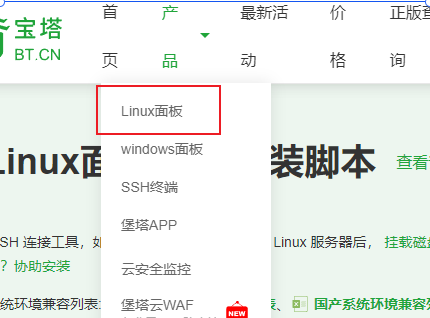
![宝塔面板安装过程]() 宝塔面板安装过程 1. 打开宝塔面板官网https://www.bt.cn/new/product.html2. 根据当前操作系统选择对应的命令3. 选择立即免费安装4. 选择Linux面板8.0.25. 选择当前的系统yum install -y wget && wget -O install.sh https://download.bt.cn/install/install_6.0.sh && sh install.sh ed8484bec6. 执行命令7. 安装成功保持好面板的登录信息,可以另存到文件中8. 访问内网地址:https://172.16.35.132:10505/027d6919登录成功后需要绑定宝塔官网账号,如果没有的话,去官网注册一个9. 绑定成功后弹出框提示你安装软件10. 等待安装完成11. 安装完成后打开软件商店确保安装程序已经启动12. 打开网站,添加站点因为目前我们没有域名,所以网站先通过IP访问,如果没有购买域名买的阿里云的服务器也是默认提供IP点击提交13. 根据ip访问站点14. 创建数据库15. 上传项目源代码源代码以zip(zip格式windows,linux都能识别)压缩包的形式上传到/www/wwwroot/172.....16. 解压zip格式的文件 使用命令 unzip typecho.zip17.再次访问我们的ip,进入程序安装向导界面 宝塔面板官方文档
宝塔面板安装过程 1. 打开宝塔面板官网https://www.bt.cn/new/product.html2. 根据当前操作系统选择对应的命令3. 选择立即免费安装4. 选择Linux面板8.0.25. 选择当前的系统yum install -y wget && wget -O install.sh https://download.bt.cn/install/install_6.0.sh && sh install.sh ed8484bec6. 执行命令7. 安装成功保持好面板的登录信息,可以另存到文件中8. 访问内网地址:https://172.16.35.132:10505/027d6919登录成功后需要绑定宝塔官网账号,如果没有的话,去官网注册一个9. 绑定成功后弹出框提示你安装软件10. 等待安装完成11. 安装完成后打开软件商店确保安装程序已经启动12. 打开网站,添加站点因为目前我们没有域名,所以网站先通过IP访问,如果没有购买域名买的阿里云的服务器也是默认提供IP点击提交13. 根据ip访问站点14. 创建数据库15. 上传项目源代码源代码以zip(zip格式windows,linux都能识别)压缩包的形式上传到/www/wwwroot/172.....16. 解压zip格式的文件 使用命令 unzip typecho.zip17.再次访问我们的ip,进入程序安装向导界面 宝塔面板官方文档 -
![MySQL实现远程连接]() MySQL实现远程连接 1. 使用 CREATE USER 语句创建一个新用户,并指定其登录密码。CREATE USER 'xiaoming'@'%' IDENTIFIED BY 'admin000';这将创建一个名为 xiaoming 的用户,允许从任何远程主机连接,并设置登录密码为 admin000。查看mysql这个数据库的user表2. 使用 GRANT 语句授予用户适当的权限。例如,如果你希望用户拥有对所有数据库的读写权限,可以执行以下命令:-- 授予部分权限 GRANT SELECT, INSERT ON 数据库.数据表 TO 'xiaoming'@'%'; -- 授予全部权限 GRANT ALL PRIVILEGES ON 数据库.数据表 TO 'xiaoming'@'%'; GRANT ALL PRIVILEGES ON *.* TO 'xiaoming'@'%';这将授予xiaoming用户从任何远程主机连接到 MySQL 并对所有数据库拥有完全的读写权限。3. 完成授权后,使用以下命令刷新权限,使更改生效:FLUSH PRIVILEGES;4. 查看当前防火墙状态5. 关闭防火墙systemctl stop firewalld.service6. cmd 测试远程连接7. Navicat for mysql ,datagrip 正常连接即可8.删除用户DROP USER 'xiaoming'@'%';
MySQL实现远程连接 1. 使用 CREATE USER 语句创建一个新用户,并指定其登录密码。CREATE USER 'xiaoming'@'%' IDENTIFIED BY 'admin000';这将创建一个名为 xiaoming 的用户,允许从任何远程主机连接,并设置登录密码为 admin000。查看mysql这个数据库的user表2. 使用 GRANT 语句授予用户适当的权限。例如,如果你希望用户拥有对所有数据库的读写权限,可以执行以下命令:-- 授予部分权限 GRANT SELECT, INSERT ON 数据库.数据表 TO 'xiaoming'@'%'; -- 授予全部权限 GRANT ALL PRIVILEGES ON 数据库.数据表 TO 'xiaoming'@'%'; GRANT ALL PRIVILEGES ON *.* TO 'xiaoming'@'%';这将授予xiaoming用户从任何远程主机连接到 MySQL 并对所有数据库拥有完全的读写权限。3. 完成授权后,使用以下命令刷新权限,使更改生效:FLUSH PRIVILEGES;4. 查看当前防火墙状态5. 关闭防火墙systemctl stop firewalld.service6. cmd 测试远程连接7. Navicat for mysql ,datagrip 正常连接即可8.删除用户DROP USER 'xiaoming'@'%'; -
![程序员考试实操题源码]() 程序员考试实操题源码 1.1 html部分<!DOCTYPE html> <html lang="en"> <head> <meta charset="UTF-8"> <title>JS Drum Kit</title> <link rel="stylesheet" href="style.css"> </head> <body> <div class="keys"> <div data-key="65" class="key"> <kbd>A</kbd> <span class="sound">clap</span> </div> <div data-key="83" class="key"> <kbd>S</kbd> <span class="sound">hihat</span> </div> <div data-key="68" class="key"> <kbd>D</kbd> <span class="sound">kick</span> </div> <div data-key="70" class="key"> <kbd>F</kbd> <span class="sound">openhat</span> </div> <div data-key="71" class="key"> <kbd>G</kbd> <span class="sound">boom</span> </div> <div data-key="72" class="key"> <kbd>H</kbd> <span class="sound">ride</span> </div> <div data-key="74" class="key"> <kbd>J</kbd> <span class="sound">snare</span> </div> <div data-key="75" class="key"> <kbd>K</kbd> <span class="sound">tom</span> </div> <div data-key="76" class="key"> <kbd>L</kbd> <span class="sound">tink</span> </div> </div> <audio data-key="65" src="sounds/clap.wav"></audio> <audio data-key="83" src="sounds/hihat.wav"></audio> <audio data-key="68" src="sounds/kick.wav"></audio> <audio data-key="70" src="sounds/openhat.wav"></audio> <audio data-key="71" src="sounds/boom.wav"></audio> <audio data-key="72" src="sounds/ride.wav"></audio> <audio data-key="74" src="sounds/snare.wav"></audio> <audio data-key="75" src="sounds/tom.wav"></audio> <audio data-key="76" src="sounds/tink.wav"></audio> </body> </html>1.2 css部分html { font-size: 10px; background-size: cover; /* background-image: url(http://i.imgur.com/b9r5sEL.jpg); */ } body, html { margin: 0; padding: 0; font-family: sans-serif; } .keys { display: flex; flex: 1; min-height: 100vh; align-items: center; justify-content: center; } .key { border: .4rem solid black; border-radius: .5rem; margin: 1rem; font-size: 1.5rem; padding: 1rem .5rem; transition: all .07s ease; width: 10rem; text-align: center; color: white; background: rgba(0, 0, 0, 0.4); text-shadow: 0 0 .5rem black; } .playing { transform: scale(1.1); border-color: #ffc600; box-shadow: 0 0 1rem #ffc600; } kbd { display: block; font-size: 4rem; } .sound { font-size: 1.2rem; text-transform: uppercase; letter-spacing: .1rem; color: #ffc600; } 1.3 js部分 <script> function removeTransition(e) { if (e.propertyName !== 'transform') return; e.target.classList.remove('playing'); } function playSound(e) { const audio = document.querySelector(`audio[data-key="${e.keyCode}"]`); const key = document.querySelector(`div[data-key="${e.keyCode}"]`); if (!audio) return; key.classList.add('playing'); audio.currentTime = 0; audio.play(); } const keys = Array.from(document.querySelectorAll('.key')); keys.forEach(key => key.addEventListener('transitionend', removeTransition)); /** * 监听页面的keydown事件,触发playAudio函数。 */ window.addEventListener('keydown', playSound); </script> 2.点名器<!DOCTYPE html> <html lang="en"> <head> <meta charset="UTF-8"> <meta name="viewport" content="width=device-width, initial-scale=1.0"> <title>Document</title> <style> .box { width: 200px; height: 40px; border: 1px solid red; text-align: center; line-height: 40px; } </style> </head> <body> <div class="box"> 随机点名 </div> <button>开始</button> <script> let names = ["赵艳","林明","郭秀英","马军","王艳","方娟","林勇","廖明","程敏","曾秀英","马平","陆强","张军","崔涛","石秀英","武丽","谭刚","蒋秀英","杨杰","陈秀兰"] let button = document.querySelector("button") let box = document.querySelector(".box") let n = 3 let timer = null let index = 0 button.addEventListener("click",()=>{ timer = setInterval(show,50) setTimeout(stop,3000) }) function show(){ index = Math.floor(Math.random()*names.length) box.innerHTML = names[index] } function stop(){ clearInterval(timer) names.splice(names.indexOf(names[index]),1) console.log(names); } </script> </body> </html>
程序员考试实操题源码 1.1 html部分<!DOCTYPE html> <html lang="en"> <head> <meta charset="UTF-8"> <title>JS Drum Kit</title> <link rel="stylesheet" href="style.css"> </head> <body> <div class="keys"> <div data-key="65" class="key"> <kbd>A</kbd> <span class="sound">clap</span> </div> <div data-key="83" class="key"> <kbd>S</kbd> <span class="sound">hihat</span> </div> <div data-key="68" class="key"> <kbd>D</kbd> <span class="sound">kick</span> </div> <div data-key="70" class="key"> <kbd>F</kbd> <span class="sound">openhat</span> </div> <div data-key="71" class="key"> <kbd>G</kbd> <span class="sound">boom</span> </div> <div data-key="72" class="key"> <kbd>H</kbd> <span class="sound">ride</span> </div> <div data-key="74" class="key"> <kbd>J</kbd> <span class="sound">snare</span> </div> <div data-key="75" class="key"> <kbd>K</kbd> <span class="sound">tom</span> </div> <div data-key="76" class="key"> <kbd>L</kbd> <span class="sound">tink</span> </div> </div> <audio data-key="65" src="sounds/clap.wav"></audio> <audio data-key="83" src="sounds/hihat.wav"></audio> <audio data-key="68" src="sounds/kick.wav"></audio> <audio data-key="70" src="sounds/openhat.wav"></audio> <audio data-key="71" src="sounds/boom.wav"></audio> <audio data-key="72" src="sounds/ride.wav"></audio> <audio data-key="74" src="sounds/snare.wav"></audio> <audio data-key="75" src="sounds/tom.wav"></audio> <audio data-key="76" src="sounds/tink.wav"></audio> </body> </html>1.2 css部分html { font-size: 10px; background-size: cover; /* background-image: url(http://i.imgur.com/b9r5sEL.jpg); */ } body, html { margin: 0; padding: 0; font-family: sans-serif; } .keys { display: flex; flex: 1; min-height: 100vh; align-items: center; justify-content: center; } .key { border: .4rem solid black; border-radius: .5rem; margin: 1rem; font-size: 1.5rem; padding: 1rem .5rem; transition: all .07s ease; width: 10rem; text-align: center; color: white; background: rgba(0, 0, 0, 0.4); text-shadow: 0 0 .5rem black; } .playing { transform: scale(1.1); border-color: #ffc600; box-shadow: 0 0 1rem #ffc600; } kbd { display: block; font-size: 4rem; } .sound { font-size: 1.2rem; text-transform: uppercase; letter-spacing: .1rem; color: #ffc600; } 1.3 js部分 <script> function removeTransition(e) { if (e.propertyName !== 'transform') return; e.target.classList.remove('playing'); } function playSound(e) { const audio = document.querySelector(`audio[data-key="${e.keyCode}"]`); const key = document.querySelector(`div[data-key="${e.keyCode}"]`); if (!audio) return; key.classList.add('playing'); audio.currentTime = 0; audio.play(); } const keys = Array.from(document.querySelectorAll('.key')); keys.forEach(key => key.addEventListener('transitionend', removeTransition)); /** * 监听页面的keydown事件,触发playAudio函数。 */ window.addEventListener('keydown', playSound); </script> 2.点名器<!DOCTYPE html> <html lang="en"> <head> <meta charset="UTF-8"> <meta name="viewport" content="width=device-width, initial-scale=1.0"> <title>Document</title> <style> .box { width: 200px; height: 40px; border: 1px solid red; text-align: center; line-height: 40px; } </style> </head> <body> <div class="box"> 随机点名 </div> <button>开始</button> <script> let names = ["赵艳","林明","郭秀英","马军","王艳","方娟","林勇","廖明","程敏","曾秀英","马平","陆强","张军","崔涛","石秀英","武丽","谭刚","蒋秀英","杨杰","陈秀兰"] let button = document.querySelector("button") let box = document.querySelector(".box") let n = 3 let timer = null let index = 0 button.addEventListener("click",()=>{ timer = setInterval(show,50) setTimeout(stop,3000) }) function show(){ index = Math.floor(Math.random()*names.length) box.innerHTML = names[index] } function stop(){ clearInterval(timer) names.splice(names.indexOf(names[index]),1) console.log(names); } </script> </body> </html>